

How To Create A Scheduler In C#
- Download source code - 11.9 KB
Introduction
One feature many Desktop and Web Applications require is to have a Scheduler. By Scheduler one means a framework which controls the parallel execution of Jobs. These Jobs can be executed only one or repeatedly. Therefore what one wishes is to have a framework which, in order to execute a Job (once or many times), it is necessary only to implement this very Job and hook it to the framework.
The goal of this article is to show how to develop this Scheduler and explaining in details the techniques and ideas behind this implementation. One may observe that, using the right design patterns and simple solutions, the outcome can be surprisingly straightforward.
The Scheduler described here is developed in a Microsoft .NET Library Project. A Microsoft .NET Console Project uses the DLL Library in order to implement and execute a few Jobs. The next sections of this article will show how exactly this is accomplished.
Background
Schedulers have always been a concern for architects when developing Enterprise Applications. Quite often the necessity for such a framework occurs because automation of parallel tasks aids immensely the user´s work, because it takes out of his or hers hand repetitive activities.
There are many ready-to-use solutions for that. On one hand, Java, for instance, provides a few schedulers, like Quartz. On the other hand, Microsoft .NET developers can take advantage of Windows Services.
There are situations, however, that one may not be able to use these tools. For instance, one may have to deploy an ASP.NET Application in a Shared Server and the usage of Windows Services is simply not allowed.
Even if one can use frameworks to handle scheduling events, it may be quite interesting to see how a solution can be implemented for this matter. In this case, it is a combination of using Threads adequately and implementing the Template Method Design Pattern.
Architecture
In this section the architecture is discussed. Firstly, the class diagram is displayed and explained.
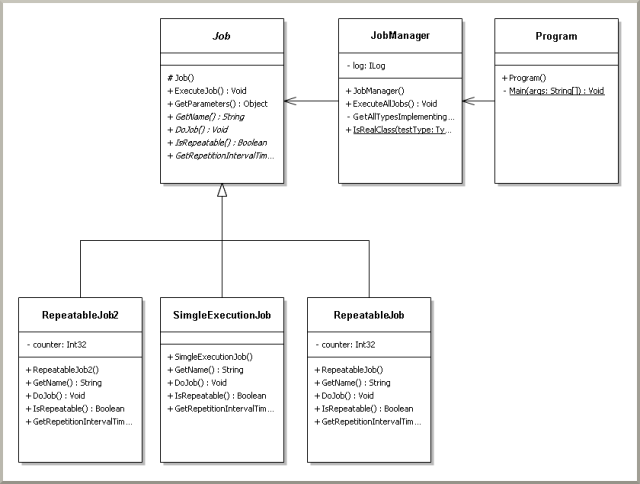
The class diagram consist of the framework (in the DLL Library) along with the execution program which dispatches the Jobs. The classes Job and JobManager encomposses the the framework; It is that simple, to implement this framework. The classes RepeatableJob, RepeatableJob2 and SingleExecutionJob are Job implementations. Their names give away their main characteristics.
The Job class is to be implemented in order to be executed, either as a repeatable, or a single-execution task. The JobManager class is responsible for gathering and executing all Jobs available (classes which extend Job).
The RepeatableJob and RepeatableJob2 are never-ending Jobs, meaning their code is always executed given fixed time-defined intervals. The SingleExecutionJob has its code run one. The only purpose of these Jobs, is to print a message stating they have been executed. This illustrates beautifully their behavior in a console, when the program is executed.
The remaining class, Program, simply instantiates the JobManager and run it. The JobManager executes the Jobs asynchronously.
After understanding the general idea of the provided classes of the application, one can now comprehend the main thoughts which are the core of this Scheduler architecture. The JobManager, gathers all Job implementation of the Job class. These Job implementations must be within the .NET Project which uses the DLL holding the Scheduler framework. After gathering these Jobs, each of them is started in a new thread. The Job class has the method ExecuteTask() which triggers the Job task implementation. If the Job is to be executed once, after the task is completed the Job finishes its execution and the thread dies. In case the Job is repeatable, the task is executed repeatedly in intervals provided by the Job´s implementation. Note here that the Job class has some methods which are implemented and others which must be provided by its implementation. This technique falls into the Method Template Design Pattern.
The next sections, the most relevant parts of the code will be explained in more details so one can have a practical understanding of how to implement the Scheduler.
Using the code
The Job class is the obvious class to start discussing. One can have a better understanding of the framework simply by looking at it.
using System; using System.Collections.Generic; using System.Linq; using System.Web; using System.Threading; namespace SchedulerManager.Mechanism { public abstract class Job { public void ExecuteJob() { if (IsRepeatable()) { while (true) { DoJob(); Thread.Sleep(GetRepetitionIntervalTime()); } } else { DoJob(); } } public virtual Object GetParameters() { return null; } public abstract String GetName(); public abstract void DoJob(); public abstract bool IsRepeatable(); public abstract int GetRepetitionIntervalTime(); } }
This class is well commented so its reading is quite facilitated. The idea here is to provide everything a Job needs to be executed. The methods´ explanation will be given below:
-
DoJob()- Here is to be provided the task execution itself. This means all the work to be done has to be put inside this method. -
IsRepeatable()- Determine whether the task is to be repeated or not. -
GetRepetitionIntervalTime()- Return the interval, in milliseconds, which the Job has to wait until it is to be executed again, in case the Job is repeatable, obviously. -
GetName()- Uniquely identifies the Job. It is very important that this name indeed is unique among the implemented Jobs in the assembly holding them, otherwise unexpected behavior is to occur. -
GetParameters()- This method is to be implemented when one wishes to pass parameters to the task execution. In order to access the entered parameters, only simply has to call this method within the task implementation -DoJob()method. -
ExecuteJob()- This method executes the task itself. It calls theDoJob()method. Note that in case the method is to be run repeatedly, theDoJob()is executed in a loop, otherwise it is called only one. Here is where the Method Template Design Pattern is applied. TheExecuteJob()method is executed based on its class´s method´s implementation.
The next class to be understood is the JobManager, which is displayed below:
using System; using System.Collections.Generic; using System.Linq; using System.Web; using System.Threading; using log4net; using SchedulerManager.Log4Net; namespace SchedulerManager.Mechanism { public class JobManager { private ILog log = LogManager.GetLogger(Log4NetConstants.SCHEDULER_LOGGER); public void ExecuteAllJobs() { log.Debug(" Begin Method"); try { IEnumerable<Type> jobs = GetAllTypesImplementingInterface(typeof(Job)); if (jobs != null && jobs.Count() > 0) { Job instanceJob = null; Thread thread = null; foreach (Type job in jobs) { if (IsRealClass(job)) { try { instanceJob = (Job)Activator.CreateInstance(job); log.Debug(String.Format( " The Job \"{0}\" has been instantiated successfully.", instanceJob.GetName())); thread = new Thread(new ThreadStart(instanceJob.ExecuteJob)); thread.Start(); log.Debug(String.Format( " The Job \"{0}\" has its thread started successfully.", instanceJob.GetName())); } catch (Exception ex) { log.Error(String.Format(" The Job \"{0}\" could not " + " be instantiated or executed.", job.Name), ex); } } else { log.Error(String.Format( " The Job \"{0}\" cannot be instantiated.", job.FullName)); } } } } catch (Exception ex) { log.Error(" An error has occured while instantiating " + " or executing Jobs for the Scheduler Framework.", ex); } log.Debug(" End Method"); } private IEnumerable<Type> GetAllTypesImplementingInterface(Type desiredType) { return AppDomain .CurrentDomain .GetAssemblies() .SelectMany(assembly => assembly.GetTypes()) .Where(type => desiredType.IsAssignableFrom(type)); } public static bool IsRealClass(Type testType) { return testType.IsAbstract == false && testType.IsGenericTypeDefinition == false && testType.IsInterface == false; } } }
Again, this class is well commented in order to ease the understanding. Have a look at the ExecuteAllJobs() method. This method, gathers all Job implementations from the assembly its being executed and run them in separate threads. Observe that this solution is quite simple. This solution does not have the dangers of deadlocks or complicated thread interactions. Furthermore, since each thread runs independently, it is very easy to debug and find errors in this framework.
One last think to be observed are the Jobs implementations. Below are displayed theSimgleExecutionJob and theRepeatableJob ones.
using System; using System.Collections.Generic; using System.Linq; using System.Text; using SchedulerManager.Mechanism; namespace SchedulerConsoleApp.Jobs { class SimgleExecutionJob : Job { public override string GetName() { return this.GetType().Name; } public override void DoJob() { System.Console.WriteLine(String.Format(" The Job \"{0}\" was executed.", this.GetName())); } public override bool IsRepeatable() { return false; } public override int GetRepetitionIntervalTime() { throw new NotImplementedException(); } } }
using System; using System.Collections.Generic; using System.Linq; using System.Text; using SchedulerManager.Mechanism; namespace SchedulerConsoleApp.Jobs { class RepeatableJob : Job { private int counter = 0; public override string GetName() { return this.GetType().Name; } public override void DoJob() { System.Console.WriteLine(String.Format( " This is the execution number \"{0}\" of the Job \"{1}\".", counter.ToString(), this.GetName())); counter++; } public override bool IsRepeatable() { return true; } public override int GetRepetitionIntervalTime() { return 1000; } } }
Note how straightforward they are: the SimgleExecutionJob provides its identifier based on its class name, implements the task, which is to print a message, and tells the Job is not repeatable. The RepeatableJob, does state the task is repetitive, provides the interval of execution, gives the class name to use as its identifier, and defines its task as a simple message printing.
Compiling and Running the Code
When one opens the code and tries to compile it, errors are displayed stating that there is no log4net libraries. This occurs because it is not allowed to upload .dll files in CodeProject articles, thus the log4net.dll was removed. Therefore, to fix the Solution Setup and build it correctly, download the log4net library clicking here. After that, create a sub-directory called libraries in the folder SchedulerManager-noexe. Inside the directory libraries copy the log4net.dll file one has just downloaded. Finally, refresh the SchedulerManager project references and you should see that the log4net reference has no warning flag. Compile the solution and run theSchedulerConsoleApp project.
Discussion
Firstly, note the simplicity of this solution, as stated before. Simply put, one gathers all Job implementations and executes them in separate threads. This straightforwardness allows one to easily add more functionalities to this framework.
In the subject of new features, one may consider having the Job´s requirements in a database. For instance, whether or not the job is repeatable, interval of execution, could be all stored in a database, each row identified by its unique name. This makes maintenance easier because in order to change their parameters execution no code change is necessary, simply database changes are needed.
Other features, such as, interface to handle the Job Management, the ability to run, pause and cancel a Job execution could also be implemented. Note however, that while these features seem nice and fancy, in most of applications there are rarely needed.
Many people argue that dealing with threads in Web Applications can be very dangerous because it may jeopardize the Application Sever. In this author´s experience, it could not be further from the truth, at least when one is working with Internet Information Services.
How To Create A Scheduler In C#
Source: https://www.codeproject.com/Articles/591271/A-Simple-Scheduler-in-Csharp
Posted by: parkblegame94.blogspot.com
0 Response to "How To Create A Scheduler In C#"
Post a Comment